
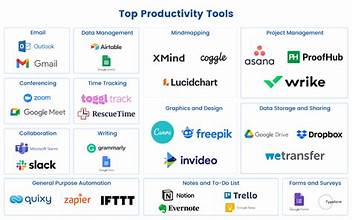
Time is your most valuable resource—and in 2025, the right productivity tools can help you make the most of it. Whether you’re a busy entrepreneur, a student juggling deadlines, or a remote worker managing multiple tasks, having the right apps can be a game changer. In this guide, we’ll explore the top 10 productivity tools for 2025 that will help you stay focused, organized, and ahead of the curve.
Top 10 Productivity Tools for 2025
1. Notion AI
An all-in-one workspace with built-in AI that helps you write, plan, manage projects, and automate your workflow.
Key Features: AI-generated content, project templates, real-time collaboration.
Why It’s Great: Combines note-taking, docs, and task management in one clean interface.
2. ClickUp 3.0
The upgraded ClickUp offers streamlined task management, docs, time tracking, and integrations for every team size.
Key Features: Custom dashboards, automation, and AI-powered summaries.
Why It’s Great: It’s highly customizable and perfect for teams or solopreneurs.
3. Motion
Motion uses AI to auto-schedule your day based on your calendar, meetings, and tasks.
Key Features: Smart calendar, meeting assistant, priority-based scheduling.
Why It’s Great: Maximizes deep work by automatically blocking focus time.
4. Trello + Automation
Trello now includes built-in automation (Butler) that handles repetitive tasks like card movement and status updates.
Key Features: Kanban boards, automated workflows, collaboration tools.
Why It’s Great: Great for visual thinkers and small teams who want simple project tracking.
5. GrammarlyGO
More than just a grammar checker, GrammarlyGO helps you write smarter emails, documents, and social posts with AI suggestions.
Key Features: AI writing, tone adjustment, plagiarism checks.
Why It’s Great: Saves hours of writing and editing time with intelligent corrections.
6. Sunsama
A daily planner that connects with all your tools (Asana, Gmail, Google Calendar) to organize your tasks into a focused daily plan.
Key Features: Task batching, calendar sync, guided planning.
Why It’s Great: Helps you avoid burnout and overloading by planning realistic workdays.
7. Slack AI
Slack’s new AI upgrades make workplace communication smarter by summarizing channels, suggesting replies, and highlighting action items.
Key Features: Smart summaries, integrated reminders, searchable context.
Why It’s Great: Cuts down on message overload while keeping you in the loop.
8. Evernote Tasks
Evernote has evolved into a productivity powerhouse with built-in tasks, calendars, and document scanning.
Key Features: Task manager, note-to-task conversion, reminders.
Why It’s Great: Keeps notes and to-dos in one place—perfect for students and writers.
9. Focusmate
A virtual coworking tool that pairs you with accountability partners in real-time focus sessions.
Key Features: Live video coworking, session tracking, productivity stats.
Why It’s Great: Great for those who struggle with motivation or remote work distractions.
10. Zapier + OpenAI Integration
Zapier now supports deeper AI workflows by integrating GPT-4 and automation triggers.
Key Features: AI task automation, multi-app workflows, no-code setup.
Why It’s Great: Automate everything from email sorting to lead generation with zero coding.