In 2025, graphic design tools are more accessible than ever, but beginners still face a big question: Canva or Photoshop—Which one should you use? Whether you’re creating content for social media, designing a logo, or editing photos, choosing the right platform can save you time, money, and frustration. Canva offers a user-friendly, template-based approach, while Photoshop is a powerhouse known for its advanced editing capabilities. In this guide, we’ll compare both tools to help you decide which is the better fit for your design goals as a beginner.
Canva vs Photoshop: Which Is Better for Beginners in 2025?
What is Canva?
Canva is a cloud-based graphic design platform that offers drag-and-drop simplicity. With thousands of ready-made templates, it’s perfect for social media graphics, presentations, posters, and more.
Pros of Canva:
- Extremely beginner-friendly interface
- No design experience required
- Cloud-based (no software installation needed)
- Huge library of free templates, fonts, and images
- Great for quick designs and content creation
- Affordable (Free and Pro plans available)
Cons of Canva:
- Limited advanced editing capabilities
- Lacks pixel-level control
- Not ideal for professional photo editing or detailed design work
🔵 What is Photoshop?
Adobe Photoshop is an industry-standard tool for photo editing, digital art, and advanced graphic design. It offers unmatched control and precision.
Pros of Photoshop:
- Professional-grade tools for detailed editing
- Great for photo manipulation and digital art
- Layer-based editing for more creative control
- Massive plugin support and community tutorials
Cons of Photoshop:
- Steep learning curve for beginners
- Requires software installation
- Subscription-based pricing (Adobe Creative Cloud)
- Overkill for simple tasks like Instagram posts or flyers
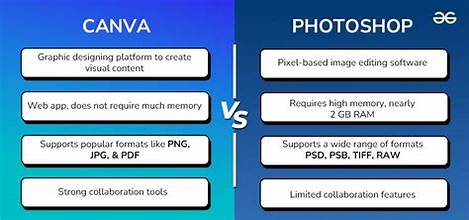
🆚 Canva vs Photoshop: Feature Comparison for Beginners
| Feature | Canva | Photoshop |
|---|---|---|
| Ease of Use | ⭐⭐⭐⭐⭐ (Beginner-friendly) | ⭐⭐ (Steep learning curve) |
| Templates | ✅ Thousands of ready-to-use | ❌ Very limited |
| Customization Power | Moderate | Advanced (Full creative control) |
| Best For | Social posts, posters, branding | Photo editing, digital artwork |
| Platform | Web-based + app | Desktop app (Windows/Mac) |
| Cost | Free & Pro ($) |